Before you start
A YouTube video playing in Chrome. Transpose, speed (up to 2×) and the A–B loop are free. Real audio quality remains pending verification in this beta.
Steps
- Detect a representative passage and check the proposed key.
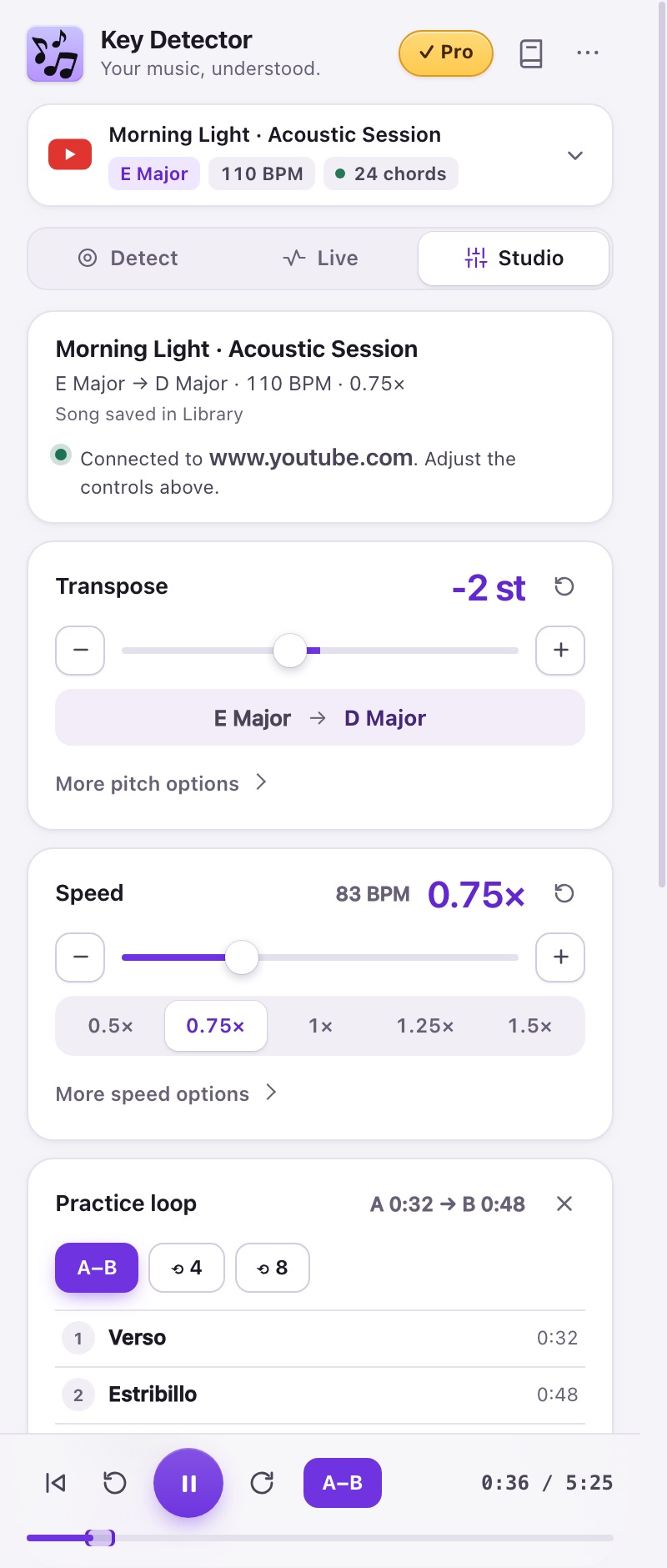
- Open Studio. The current-song card shows the source key, target key, BPM, speed and whether this song is in the Library. Transpose is above Speed.
- If the original song is E and you want D, set −2 semitones. Leave Speed at 1.00×.
- If the recording sounds slightly out of tune against your instrument, open Fine tune under Transpose (±50 cents). When the analysis of this same video measured an offset, Match A440 applies the correction in one click. Fine tune is not saved in the Library yet.
- Compare with your instrument. Reset all returns to the original key and normal speed and clears the practice loop.
- Choose Save song, review the draft in the Library and press Save song there.
Expected result
The controls show −2 st and 1.00×. Confirm the audible result before relying on it.
If it does not work
Studio supports YouTube. If no video is found, start one; if requested, refresh the page after an extension update. A file result does not transpose a YouTube video automatically.
Access
Transpose, speed up to 2× and A–B are free. Pro/trial adds ±24 semitones, 2.5–4×, sound tools and markers.