Before you start
Pro/trial and an audio file (MP3, WAV, M4A, FLAC or OGG). The file is analysed on your computer and never uploaded.
Steps
- Open the Player from the icon at the top of Key Detector, or from a saved file song in the Library.
- Drop the file on the page or choose it. The waveform appears at once; chords and beats follow in a few seconds.
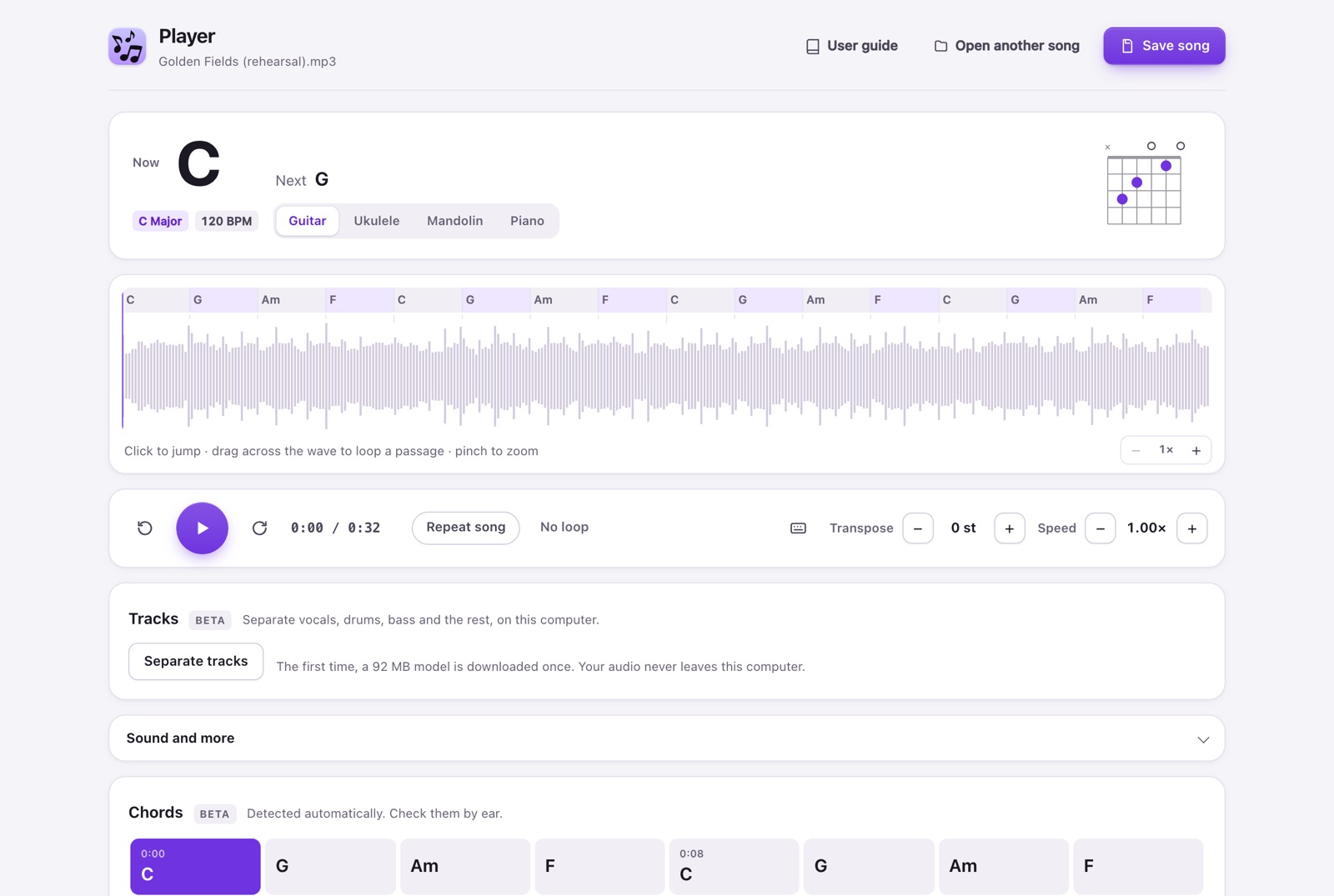
- Press Play (or Space). The big chord is what sounds now, with the next chord beside it and a guitar, ukulele, mandolin or piano diagram. Sevenths (G7, Cmaj7, Am7) appear only when they are clearly there. The chord grid highlights the current bar; click any bar to jump there.
- Drag across the waveform to loop a passage. The loop snaps to nearby beats; press L or the loop button to clear it. [ and ] set A and B at the current position. Pinch (or ⌘/Ctrl + scroll) to zoom the waveform for a precise loop; − and + do the same, and the view follows the song. Press ? (or the keyboard button) to see every shortcut and change any key.
- Use Transpose and Speed. The chords, key and diagrams follow the new key. Sound and more holds the sound presets, vocal reduction, fine tune, tape effect and Natural voice when transposing, which keeps a singer from sounding like a chipmunk.
- Tracks (beta): choose Separate tracks to split vocals, drums, bass and the other instruments on your computer. The first time a 92 MB model downloads once; with graphics acceleration a song takes about a third of its length. Then use No vocals, No drums, No bass or Vocals only, or each track’s volume and Mute. Key, speed and loops keep working.
- A MIDI pedal or controller can play, loop and change key or speed: open Sound and more → MIDI controller, turn it on and press Learn next to each action.
- Choose Save song to keep the chart, key, speed and loop in the Library. Next time, choose the same file again and they come back. If you add clips to the song in the Library, a Clips card appears: press a clip to repeat it at its own speed and key, or Play sequence to go through them in order.
Expected result
The waveform, chords and grid move together while the song plays, also with the tab in the background.
If it does not work
If a file does not open, try another format. If chords look wrong, trust your ear: they are detected automatically and marked beta. The Library never keeps the audio, so reopening needs the original file.
Access
Player is Pro/trial, like Studio.