Before you start
Pro/trial; a detected file, YouTube song or editable chart.
Steps
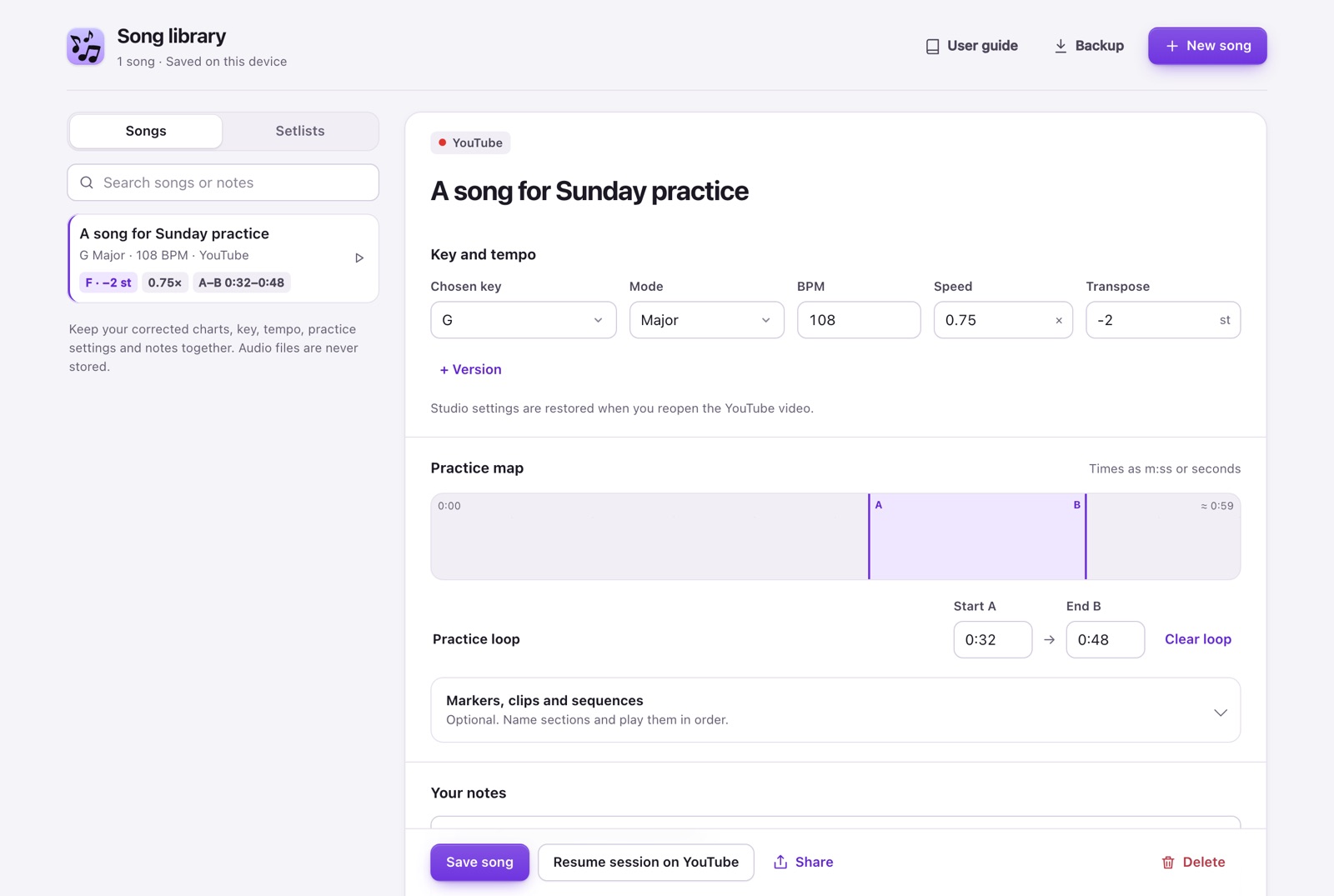
- Choose Save song from the result, Studio or chart. Review the title, original/chosen key, semitone offset, BPM, speed and A–B in the Library draft. For a song several people sing, press + Version (for example “Anna”): each version keeps its own transposition, speed and loop, and the chip you pick is the one that opens on YouTube.
- Add notes and press Save song. Opening a draft alone does not save it.
- Search by title or notes, select the song and choose Resume session on YouTube. Resume clears previous practice settings before restoring the saved speed, semitones and loop, including zero semitones or no loop. Check for a partial-restoration warning in the Library.
- For files, Open chart restores derived musical data and notes. Select the original file again from Detect → Browse to analyze it again; the audio is never stored.
- In Practice map, type times as m:ss (1:05) or seconds. Open the optional Markers, clips and sequences section to add named markers, use two of them as A–B, and add clips with their own repetitions, count-in, speed and pitch. The map shows the loop, markers and clips; click one to edit it.
- Save the song, then choose Play sequence on YouTube. The included clips play in order; the bar under the video shows clip, lap, speed and pitch, with Previous, Next and Stop. When it ends, the video pauses and returns to the song’s speed and pitch.
- Setlists: choose Setlists in the sidebar, then New setlist. Add songs in order; each shows the key you play it in. It saves as you go, and Print setlist gives a clean sheet for rehearsal.
- Share: choose Share on a saved song to copy a link with its key, settings, markers, clips and chords (never audio or your notes). The link is not stored on any server; whoever opens it with Key Detector gets the song in their Library.
- Export backup downloads JSON locally. Import backup validates it and adds new songs while keeping existing entries unchanged. Keep the file private: it contains titles, links and notes.
Expected result
The Library preserves metadata on this Chrome profile. It is not cloud sync; uninstalling or clearing extension data can remove it.
If it does not work
Save edits before resuming. If YouTube loads slowly, wait and choose Resume session again; the Library reuses the same tab. If you navigate to another song during restoration, it stops: return to the saved song and retry. Saving practice without a new analysis preserves an existing song’s edited key and BPM. Back up before changing profiles. Corrected charts remain beta and should be checked by ear.
Access
The Library is Pro/trial; charts are free on 3 songs a month. Up to 100 saved songs; a full library refuses new entries without deleting old ones.